Packaging a LangGraph Agent
The LUML SDK can package LangGraph workflows as .luml files, preserving the graph structure, dependencies, and environment variable declarations. This guide covers the full process: defining a LangGraph agent, packaging it, tracking the experiment, and uploading the result to the platform.
Note: this guide assumes familiarity with LangGraph concepts — state graphs, nodes, edges, and compilation. For general SDK setup, experiment tracking, model cards, and the upload API, see the SDK Tutorial. This guide focuses on the parts specific to LangGraph.
Setup
Install the SDK along with langgraph and the LLM provider library your agent will use.
pip install "luml-sdk" langgraph langchain-openai
Note: the SDK requires Python 3.12 or later.
Defining a Graph
The packaging function accepts a compiled LangGraph Pregel instance. The example below builds a two-node agent that takes a user question, calls an LLM, and returns the response.
from typing import TypedDict
from langgraph.graph import StateGraph, START, END
from langchain_openai import ChatOpenAI


class AgentState(TypedDict):
    question: str
    answer: str


llm = ChatOpenAI(model="gpt-4o-mini")


def think(state: AgentState) -> dict:
    response = llm.invoke(state["question"])
    return {"answer": response.content}


workflow = StateGraph(AgentState)
workflow.add_node("think", think)
workflow.add_edge(START, "think")
workflow.add_edge("think", END)

graph = workflow.compile()
The compiled graph object is what gets passed to the packaging function.
Packaging the Graph
The save_langgraph function serializes the graph, detects its input and output schemas, bundles dependencies, and writes a .luml file. It returns a ModelReference that can be used to attach experiment data and model cards.
from luml.integrations.langgraph import save_langgraph

model_ref = save_langgraph(
    graph,
    path="qa_agent.luml",
    env_vars=["OPENAI_API_KEY"],
    manifest_model_name="qa_agent",
    manifest_model_version="1.0.0",
)
The env_vars parameter declares which environment variables the graph needs at runtime. These are not stored in the .luml file — they are injected by the Satellite during deployment through the platform's secret injection mechanism. Any variable listed here must be added as a Secret in the Orbit before deploying.
Passing the Graph
save_langgraph accepts the graph in three forms.
A compiled Pregel instance is the most common approach, shown above.
A callable (a function that returns a Pregel) is useful when the graph depends on runtime-scoped objects that cannot be imported directly. The callable is serialized with cloudpickle and re-executed when the model loads.
def create_graph():
    workflow = StateGraph(AgentState)
    workflow.add_node("think", think)
    workflow.add_edge(START, "think")
    workflow.add_edge("think", END)
    return workflow.compile()

model_ref = save_langgraph(create_graph, path="qa_agent.luml")
An import path string (for example "my_app.graphs::qa_graph") dynamically imports the object at packaging time. This is convenient when the graph is defined in another module.
Dependencies and Local Code
By default, save_langgraph auto-detects installed pip packages and local code modules. This behavior can be overridden.
The dependencies parameter controls pip packages. Set it to "default" (auto-detect), "all" (include everything), or provide an explicit list. To add packages on top of auto-detection without replacing the default set, use extra_dependencies.
model_ref = save_langgraph(
    graph,
    path="qa_agent.luml",
    extra_dependencies=["tiktoken"],
)
The extra_code_modules parameter controls which local Python modules are bundled into the .luml file. The default value "auto" detects them automatically. Pass an explicit list to override, or None to skip bundling local code entirely.
Schema Inference
Unlike scikit-learn models, LangGraph graphs do not require example data for schema inference. The SDK calls graph.get_input_schema() and graph.get_output_schema() to extract schemas directly from the graph's type annotations. The resulting input schema wraps the graph's native input in a payload structure with optional fields for command, config, and context. The output schema includes the graph's result and any pending interrupts.
For the API reference and the full parameter list, see the save_langgraph reference.
Model Card
save_langgraph automatically generates a model card containing a Mermaid diagram of the graph. This diagram is rendered in the LUML web interface when viewing the model. Additional content (text, tables, plots) can be added using ModelCardBuilder, as described in the SDK Tutorial.
Experiment Tracking
Experiment tracking for LangGraph models works the same way as for any other framework. Create an ExperimentTracker, log parameters and metrics, then link the experiment to the model reference.
from luml.experiments.tracker import ExperimentTracker

tracker = ExperimentTracker("sqlite://./experiments")
exp_id = tracker.start_experiment(
    name="qa_agent_v1",
    group="qa_agents",
    tags=["langgraph", "gpt-4o-mini"],
)

tracker.log_static("llm_model", "gpt-4o-mini")
tracker.log_static("node_count", 1)

# Log evaluation results
for i, (question, expected) in enumerate(eval_set):
    result = graph.invoke({"question": question})
    score = evaluate(result["answer"], expected)
    tracker.log_dynamic("eval_score", score, step=i)

tracker.link_to_model(model_ref, experiment_id=exp_id)
tracker.end_experiment(exp_id)
Tracing LLM Calls
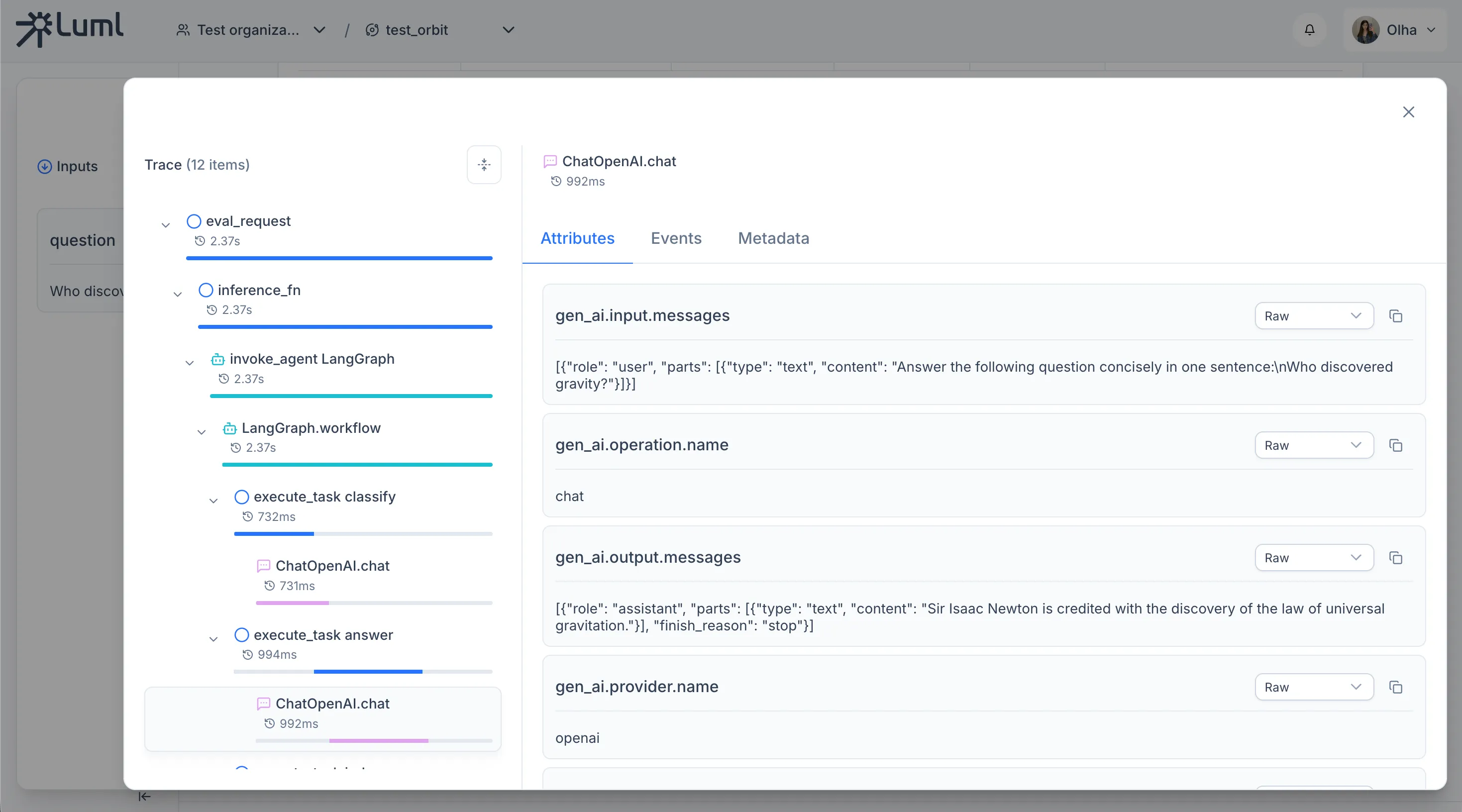
The SDK uses OpenTelemetry to capture execution spans automatically. Two instrumentors are needed for LangGraph agents: instrument_openai() for OpenAI API calls, and LangchainInstrumentor for LangChain and LangGraph internals (node executions, chain invocations). Both must be called before constructing any LangChain models or compiling the graph.
from luml.experiments.tracing import instrument_openai
from opentelemetry.instrumentation.langchain import LangchainInstrumentor

instrument_openai()
LangchainInstrumentor().instrument()
Enable tracing on the tracker to route all captured spans to the experiment's storage.
tracker = ExperimentTracker("sqlite://./experiments")
tracker.enable_tracing()
From this point on, every graph.invoke call produces a trace with parent–child spans for each graph node and each LLM call within it. No changes to node code are required. Span attributes follow the OpenTelemetry GenAI semantic conventions and are recognized by the LUML platform when rendering trace details.
Logging Eval Samples
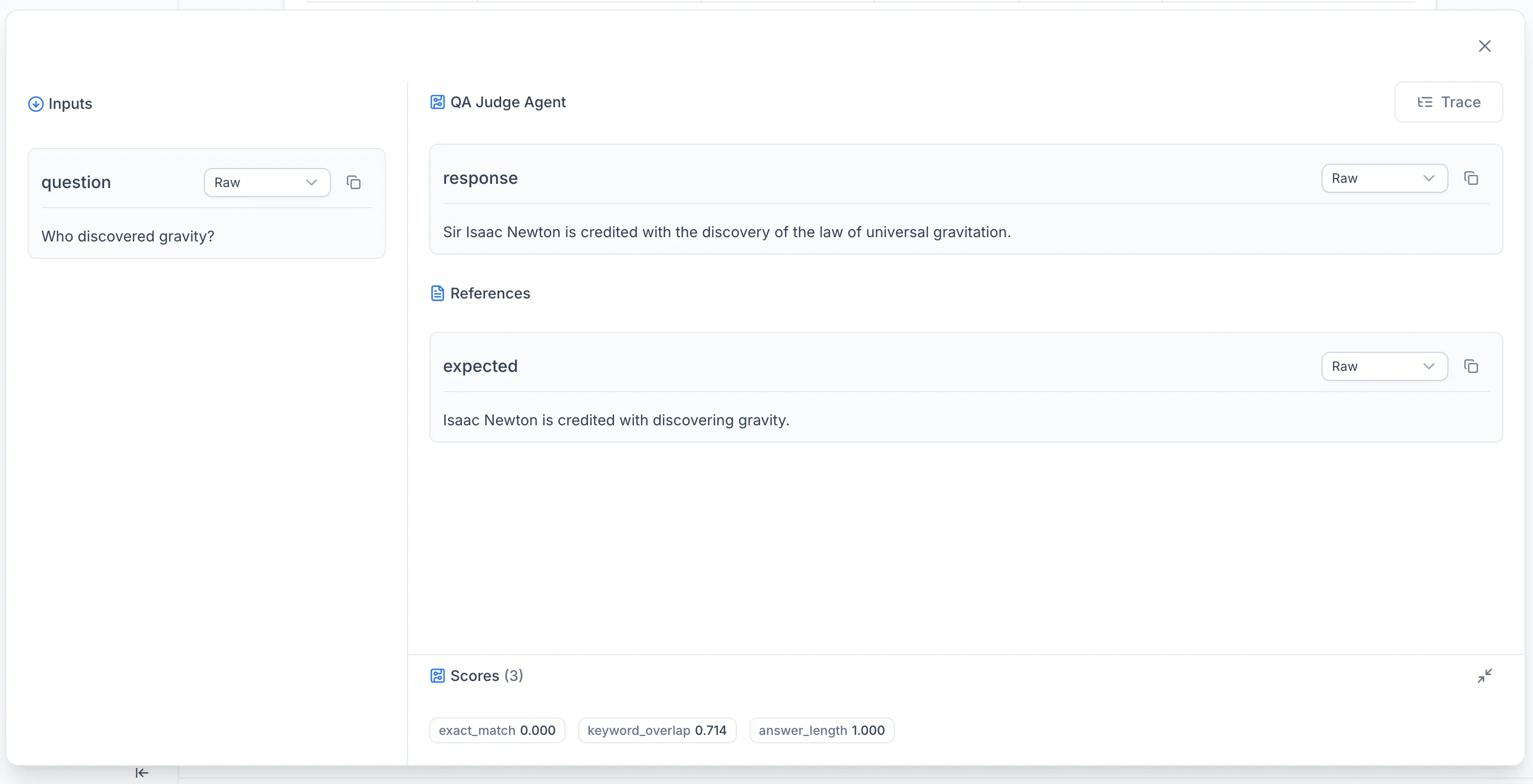
Eval samples record the inputs, outputs, reference answers, and scores for individual evaluation runs. Each sample belongs to a named dataset and can be linked to the trace produced during its execution.
DATASET_ID = "qa_eval_v1"

eval_id = f"step-{step}"

tracker.log_eval_sample(
    eval_id=eval_id,
    dataset_id=DATASET_ID,
    inputs={"question": question},
    outputs={"answer": result["answer"]},
    references={"expected": expected},
    scores={
        "judge_score":     result["judge_score"] / 10,   # normalise to 0–1
        "judge_score_raw": result["judge_score"],
    },
    metadata={"step": step, "question_type": result["question_type"]},
    experiment_id=exp_id,
)
To connect an eval sample with its execution trace — so the platform can navigate from a score to the spans that produced it — call link_eval_sample_to_trace after logging the sample.
tracker.link_eval_sample_to_trace(
    eval_dataset_id=DATASET_ID,
    eval_id=eval_id,
    trace_id=trace_id,
    experiment_id=exp_id,
)
Both calls must use the same experiment_id, eval_id, and trace_id. The dataset_id groups samples across runs: if multiple experiments use the same dataset identifier, their samples are collected in a single dataset view on the platform.
Automated Evaluation with Scorers
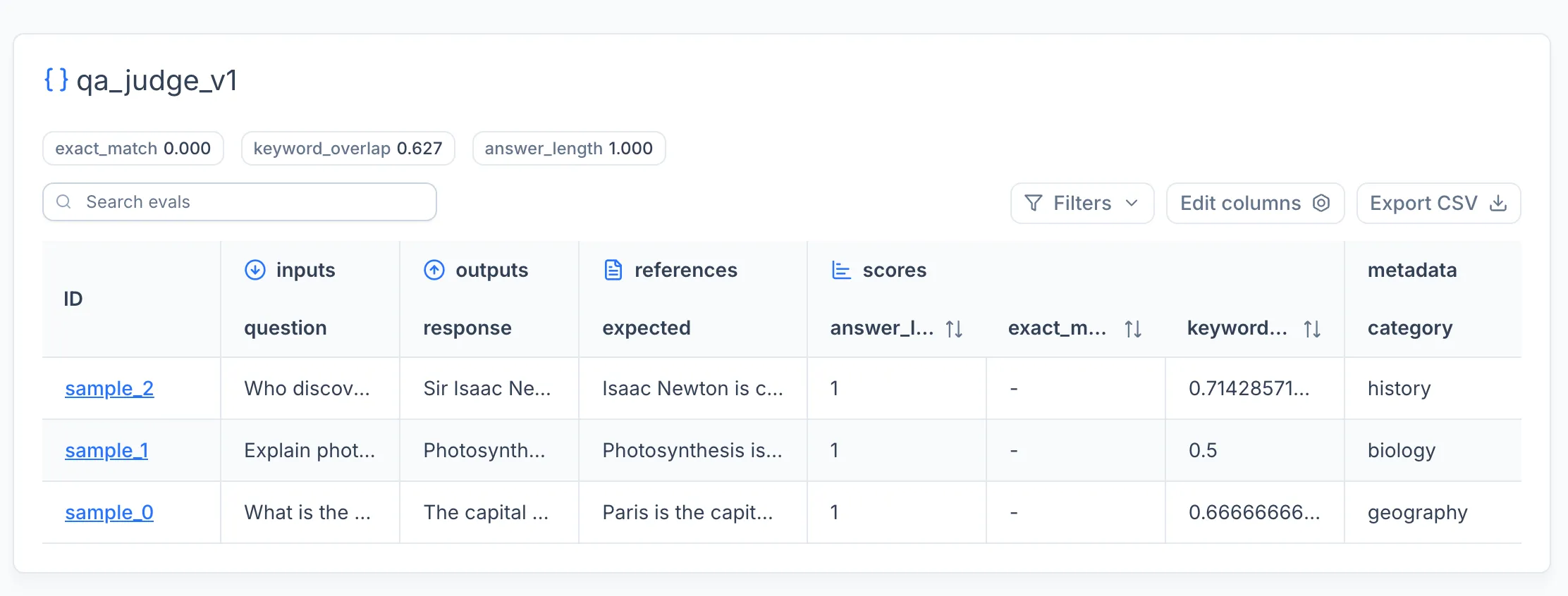
The manual approach shown above gives full control over trace and eval logging. For most workflows, the SDK provides a higher-level evaluate function that handles inference, scoring, tracing, and eval sample logging in a single call.
Eval Items
Evaluation datasets are defined as lists of EvalItem objects. Each item has an id, a dictionary of inputs, an optional expected_output for supervised scoring, and optional metadata.
from luml.experiments.evaluation.types import EvalItem

eval_dataset = [
    EvalItem(
        id="sample_0",
        inputs={"question": "What is the capital of France?"},
        expected_output="Paris is the capital of France.",
        metadata={"category": "geography"},
    ),
    EvalItem(
        id="sample_1",
        inputs={"question": "Explain photosynthesis in one sentence."},
        expected_output=(
            "Photosynthesis is the process by which plants use sunlight, water, "
            "and CO2 to produce glucose and oxygen."
        ),
        metadata={"category": "biology"},
    ),
]
Scorers
Scorers compute quality metrics for each eval item. The SDK provides two decorator-based scorer types.
A supervised_scorer receives the inputs, expected output, and model output. It is used when reference answers are available.
from luml.experiments.evaluation.scorers.base import supervised_scorer

@supervised_scorer
def keyword_overlap(inputs, expected, output):
    """Fraction of expected keywords present in the answer."""
    expected_words = set(expected.lower().split())
    output_words = set(output.lower().split())
    if not expected_words:
        return 0.0
    return len(expected_words & output_words) / len(expected_words)
An unsupervised_scorer receives only the inputs and model output. It is used for metrics that do not need a reference answer.
from luml.experiments.evaluation.scorers.base import unsupervised_scorer

@unsupervised_scorer
def answer_length(inputs, output):
    """Penalize very short or very long answers."""
    length = len(output.split())
    if length < 3:
        return 0.0
    if length > 100:
        return 0.5
    return 1.0
Scorers can return a bool, float, int, or a dict[str, Any] for multi-metric scorers. For subclass-based scorers, extend SupervisedScorer or UnsupervisedScorer directly and implement the score method.
Running Evaluation
The evaluate function takes the dataset, an inference function, and a list of scorers. It runs inference on each item, applies all scorers, logs eval samples and traces to the experiment tracker, and returns aggregated results.
from luml.experiments.evaluation.evaluate import evaluate

def run_agent(inputs: dict) -> str:
    result = graph.invoke({
        "question": inputs["question"],
        "expected": "",
    })
    return result["answer"]

eval_results = evaluate(
    eval_dataset=eval_dataset,
    inference_fn=run_agent,
    scorers=[keyword_overlap, answer_length],
    dataset_id="qa_eval_v1",
    experiment_tracker=tracker,
)
The inference_fn receives the inputs dict from each EvalItem and returns the model output. The evaluate function creates OpenTelemetry spans for each invocation, so traces are captured automatically when tracing is enabled on the tracker.
The returned EvalResults object contains per-item results (each with the EvalItem, model response, scores, and trace_id) and aggregated_scores averaged across the dataset.
for key, value in eval_results.aggregated_scores.items():
    tracker.log_static(f"eval_{key}", value)
Automatic Tracing
Instead of manually creating spans with log_span, call enable_tracing on the tracker before starting the experiment. This sets up OpenTelemetry-based tracing that automatically captures execution spans during inference.
tracker = ExperimentTracker("sqlite://./experiments")
tracker.enable_tracing()

exp_id = tracker.start_experiment(
    name="eval_run",
    group="demo",
    tags=["langgraph", "evals"],
)
When combined with instrument_openai(), this captures both the high-level agent execution and the individual LLM calls within each graph invocation. The evaluate function links each eval sample to its corresponding trace, so the platform can navigate from a score directly to the spans that produced it.
Uploading to LUML
Upload the packaged .luml file using LumlClient. This step is identical to uploading any other model type.
from luml_api import LumlClient

luml = LumlClient(
    api_key="luml_your_api_key",
    organization="My Organization",
    orbit="Default Orbit",
    collection="Agents",
)

artifact = luml.artifacts.upload(
    file_path="qa_agent.luml",
    name="QA Agent",
    description="Question-answering agent built with LangGraph and GPT-4o-mini",
    tags=["langgraph", "qa", "v1"],
)
Note: the API key can also be set via the LUML_API_KEY environment variable. See the SDK Tutorial for details on LumlClient configuration.
Complete Example
from typing import TypedDict

from dotenv import load_dotenv
from langgraph.graph import StateGraph, START, END
from langchain_openai import ChatOpenAI

load_dotenv()

from opentelemetry.instrumentation.langchain import LangchainInstrumentor
from luml.experiments.tracker import ExperimentTracker
from luml.experiments.tracing import instrument_openai
from luml.experiments.evaluation.evaluate import evaluate
from luml.experiments.evaluation.scorers.base import supervised_scorer, unsupervised_scorer
from luml.experiments.evaluation.types import EvalItem
from luml.integrations.langgraph import save_langgraph
from luml_api import LumlClient

instrument_openai()
LangchainInstrumentor().instrument()

# Models

llm_answerer = ChatOpenAI(model="gpt-4o-mini", temperature=0.3)
llm_judge    = ChatOpenAI(model="gpt-4o-mini", temperature=0)

ANSWERER_MODEL = "gpt-4o-mini"
JUDGE_MODEL    = "gpt-4o-mini"

# LangGraph

REFINE_THRESHOLD = 6.0


class AgentState(TypedDict):
    question:      str
    expected:      str
    question_type: str
    answer:        str
    judge_output:  str
    judge_score:   float
    refined:       bool


def classify_node(state: AgentState):
    prompt = (
        f"Classify the following question as either 'fact' or 'explanation'.\n"
        f"Return only one word: fact or explanation.\n\n"
        f"Question: {state['question']}"
    )
    result = llm_answerer.invoke(prompt)
    q_type = "explanation" if "explanation" in result.content.lower() else "fact"
    return {"question_type": q_type, "refined": False}


def answer_node(state: AgentState):
    if state["question_type"] == "explanation":
        prompt = f"Give a clear, educational explanation in 2–3 sentences:\n{state['question']}"
    else:
        prompt = f"Answer the following question concisely in one sentence:\n{state['question']}"
    result = llm_answerer.invoke(prompt)
    return {"answer": result.content}


def judge_node(state: AgentState):
    prompt = (
        f"You are an evaluator.\n"
        f"Compare the model answer to the expected answer and rate it 0–10, where:\n"
        f"  10 = perfectly correct and complete\n"
        f"   0 = completely wrong or missing\n\n"
        f"Question: {state['question']}\n"
        f"Expected answer: {state['expected']}\n"
        f"Model answer: {state['answer']}\n\n"
        f"Return only a single integer between 0 and 10."
    )
    result = llm_judge.invoke(prompt)
    try:
        score = float(result.content.strip())
    except ValueError:
        score = 5.0
    return {"judge_output": result.content, "judge_score": score}


def refine_node(state: AgentState):
    prompt = (
        f"Your previous answer received a low score.\n"
        f"Question: {state['question']}\n"
        f"Your answer: {state['answer']}\n"
        f"Judge feedback score: {state['judge_score']}/10\n\n"
        f"Rewrite the answer to be more accurate and complete."
    )
    result = llm_answerer.invoke(prompt)
    return {"answer": result.content, "refined": True}


def should_refine(state: AgentState) -> str:
    if state["judge_score"] < REFINE_THRESHOLD and not state["refined"]:
        return "refine"
    return END


workflow = StateGraph(AgentState)
workflow.add_node("classify", classify_node)
workflow.add_node("answer",   answer_node)
workflow.add_node("judge",    judge_node)
workflow.add_node("refine",   refine_node)
workflow.add_edge(START,       "classify")
workflow.add_edge("classify",  "answer")
workflow.add_edge("answer",    "judge")
workflow.add_conditional_edges("judge", should_refine, {"refine": "refine", END: END})
workflow.add_edge("refine",    END)
graph = workflow.compile()

# Package the graph

model_ref = save_langgraph(
    graph,
    path="qa_judge_agent.luml",
    env_vars=["OPENAI_API_KEY"],
    manifest_model_name="qa_judge_agent",
    manifest_model_version="1.0.0",
)

# Scorers

@supervised_scorer
def exact_match(inputs, expected, output):
    """Binary: does the answer contain the key fact?"""
    return expected.lower().strip(". ") in output.lower()


@supervised_scorer
def keyword_overlap(inputs, expected, output):
    """Fraction of expected keywords present in the answer."""
    expected_words = set(expected.lower().split())
    output_words = set(output.lower().split())
    if not expected_words:
        return 0.0
    return len(expected_words & output_words) / len(expected_words)


@unsupervised_scorer
def answer_length(inputs, output):
    """Penalize very short or very long answers."""
    length = len(output.split())
    if length < 3:
        return 0.0
    if length > 100:
        return 0.5
    return 1.0

# Dataset

DATASET_ID = "qa_judge_v1"

eval_dataset = [
    EvalItem(
        id="sample_0",
        inputs={"question": "What is the capital of France?"},
        expected_output="Paris is the capital of France.",
        metadata={"category": "geography"},
    ),
    EvalItem(
        id="sample_1",
        inputs={"question": "Explain photosynthesis in one sentence."},
        expected_output=(
            "Photosynthesis is the process by which plants use sunlight, water, "
            "and CO2 to produce glucose and oxygen."
        ),
        metadata={"category": "biology"},
    ),
    EvalItem(
        id="sample_2",
        inputs={"question": "Who discovered gravity?"},
        expected_output="Isaac Newton is credited with discovering gravity.",
        metadata={"category": "history"},
    ),
]

# Experiment setup

tracker = ExperimentTracker("sqlite://./llm_judge_eval")
tracker.enable_tracing()

exp_id = tracker.start_experiment(
    name="llm_judge_eval",
    group="demo",
    tags=["llm-judge", "evals", "traces", "langgraph"],
)

tracker.log_static("answerer_model",   ANSWERER_MODEL)
tracker.log_static("judge_model",      JUDGE_MODEL)
tracker.log_static("graph_nodes",      ["classify", "answer", "judge", "refine"])
tracker.log_static("refine_threshold", REFINE_THRESHOLD)

# Inference function

def run_agent(inputs: dict) -> str:
    result = graph.invoke({
        "question": inputs["question"],
        "expected": "",
    })
    return result["answer"]

# Run evaluation

eval_results = evaluate(
    eval_dataset=eval_dataset,
    inference_fn=run_agent,
    scorers=[exact_match, keyword_overlap, answer_length],
    dataset_id=DATASET_ID,
    experiment_tracker=tracker,
)

# Log aggregated scores

for key, value in eval_results.aggregated_scores.items():
    tracker.log_static(f"eval_{key}", value)

# Close & export

tracker.link_to_model(model_ref, experiment_id=exp_id)
tracker.end_experiment(exp_id)

tracker.export("qa_judge_eval.luml", experiment_id=exp_id)

luml = LumlClient(
    api_key="luml_your_api_key",
    organization="My Organization",
    orbit="Default Orbit",
    collection="Agents",
)

luml.artifacts.upload(
    file_path="qa_judge_agent.luml",
    name="QA Judge Agent",
    description="LangGraph QA agent with LLM-as-judge evaluation",
    tags=["langgraph", "qa", "llm-judge"],
)
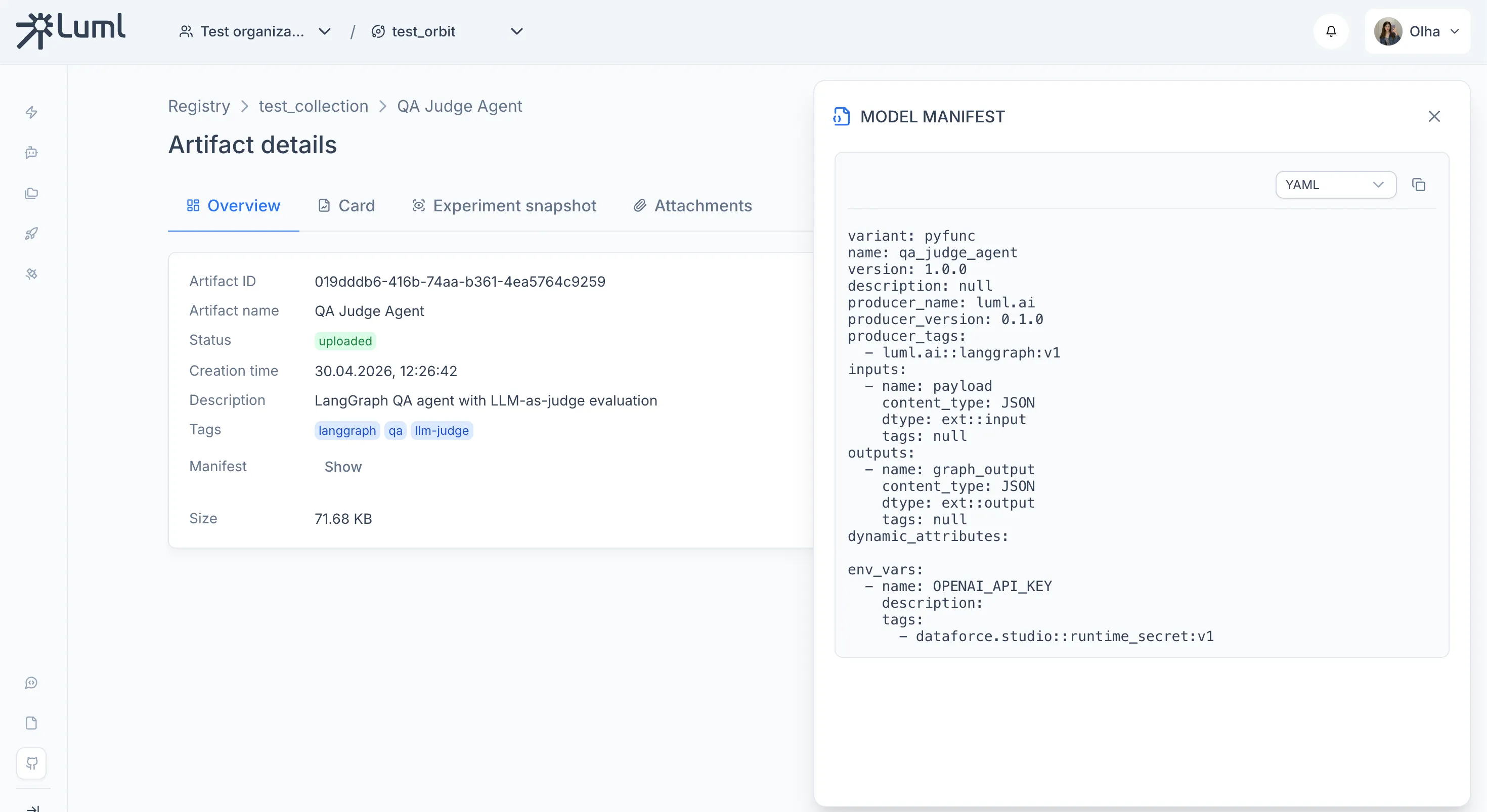
After running this code - you can go to LUML and see your model:
Model overview
Experiment snapshot - Traces
Experiment snapshot - Evaluations