Workflows
A workflow is a multi-step run designed to optimize a metric over an extended period of time, potentially across many hours or days. It is the primary mechanism for automating ML experimentation: the agent makes changes, runs the training code, observes metrics, and iterates.
Objective and Metric
When a workflow is created, the user provides an objective as free-form text. The objective is passed directly into the agent's prompt and serves as both task specification and policy. It must describe what the workflow optimizes for. The metric can be stated explicitly (for example, "maximize validation accuracy") or be inferred from the wider description, the dataset, or the codebase. When the natural objective is a loss to minimize, the workflow inverts it internally so that the orchestrator always treats the metric as a quantity to maximize.
The metric for an individual run is captured from .prisma/result.json, a file the training script writes after each execution. The schema and conventions for this file are part of the agent contract described below.
Tree of Nodes
A workflow is structured as a tree of nodes. Four node types make up that tree, each with a fixed role.
Implement. Edits the code in a worktree to satisfy a prompt. Each Implement node produces commits on its own branch. This is the only node type that modifies code.
Run. Executes the configured run command (default uv run main.py) in the worktree of its parent Implement node. The run captures stdout, the exit code, and any data emitted in .prisma/result.json. A run is treated as successful only if the command exits with status 0.
Debug. Spawned automatically when a Run fails. The Debug node receives the failed run's error output and is instructed to repair the code so the next run can succeed. Multiple debug retries can be chained back to back, up to a configurable cap.
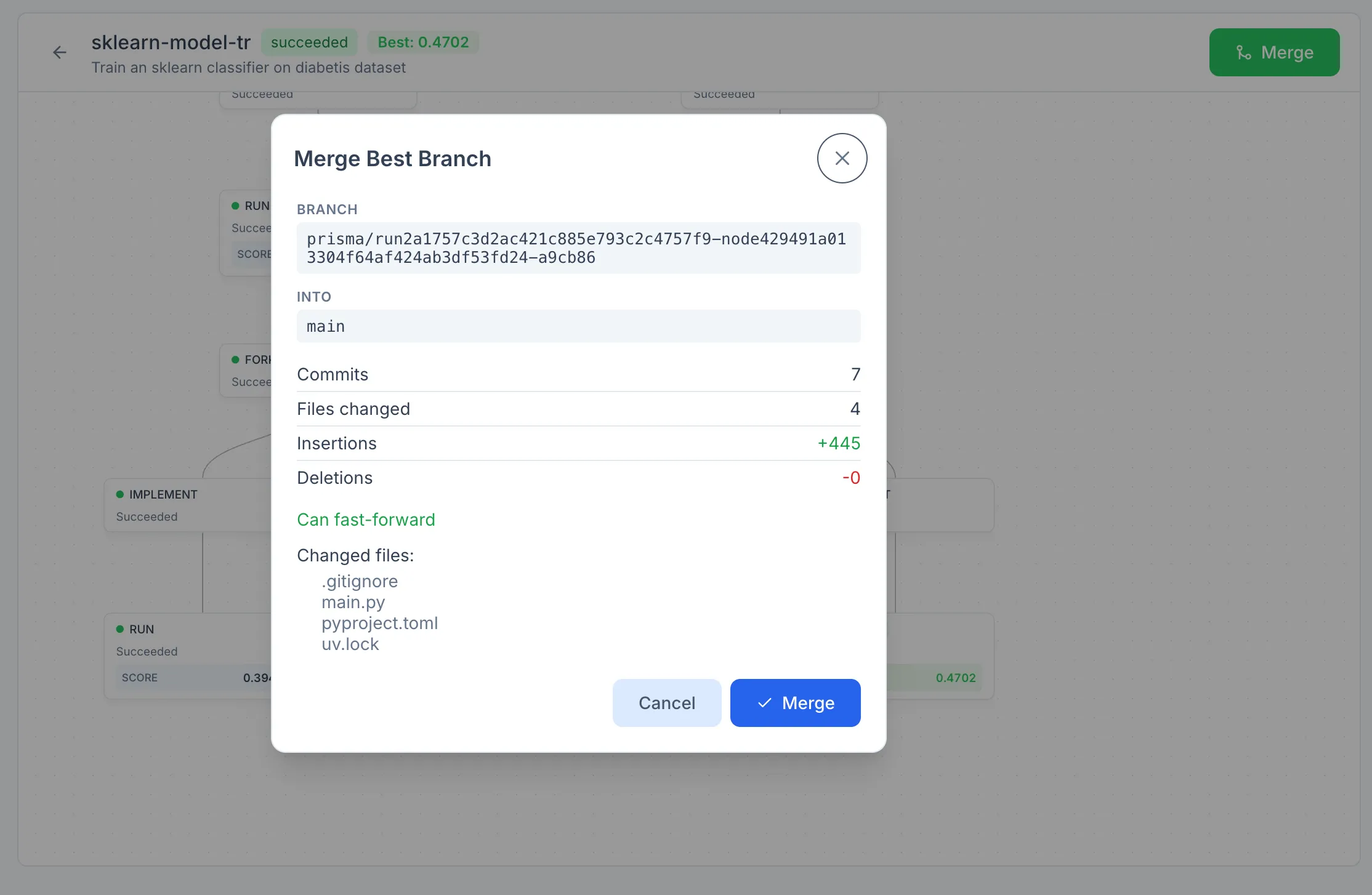
Fork. Inspects the experiment data of a successful Run node and proposes alternative directions to explore. Each proposal becomes a child Implement node on its own branch. The Fork node is where the tree splits; without forks, a workflow is a single linear chain.
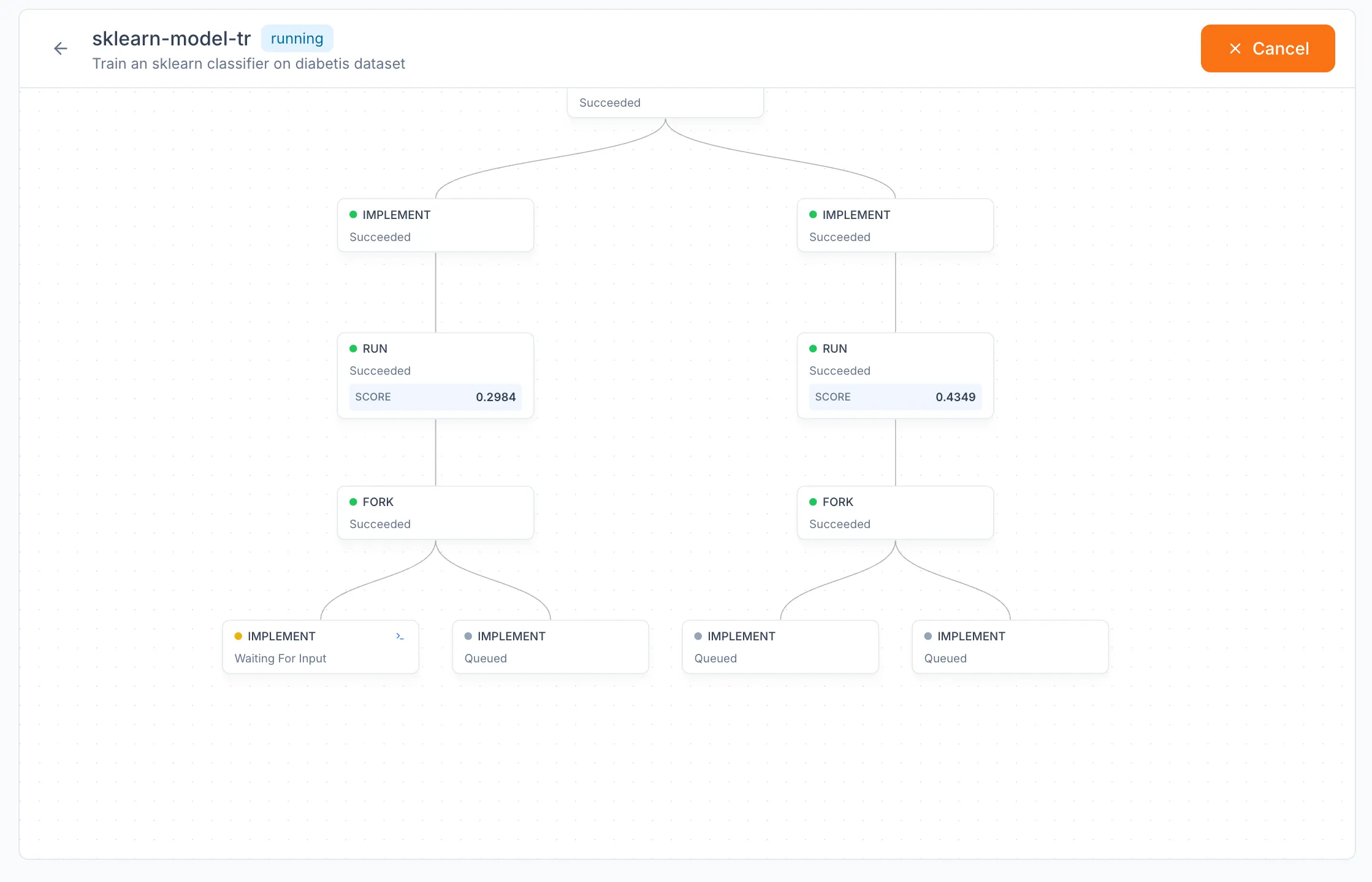
The tree is rendered as a graph in the workflow detail view. Each node is inspectable, and active nodes can be attached to via their terminal. When a node runs in non-auto mode, attaching to its terminal allows interactive use of the coding CLI, including responses to prompts the agent might raise.
Creating a Workflow
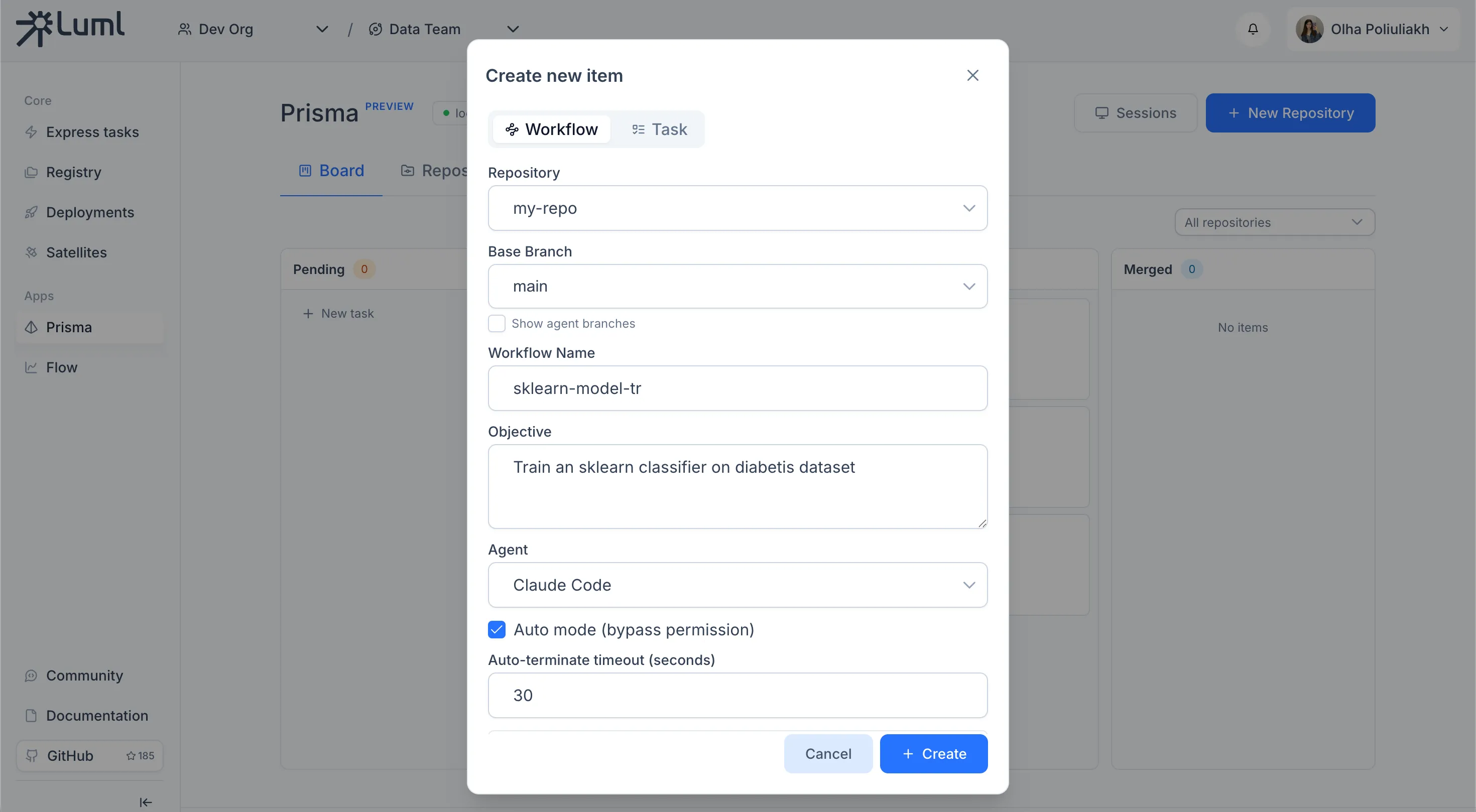
The workflow creation form collects the configuration for the entire run.
Repository. Picks the registered repository the workflow operates on.
Base branch. The branch that all worktrees fork from. Branches starting with prisma/ are hidden by default; the Show agent branches checkbox surfaces them.
Workflow name. Used as both the human-readable label on the board and the slug for generated branch names.
Objective. Free-form text describing the goal. This is the prompt the agent is given on the root Implement node.
Agent. A coding CLI from the list of agents detected on the system at startup.
Auto mode. Runs the agent in its bypass-permissions mode. When enabled, an additional Auto-terminate timeout field controls how long Prisma waits without observed terminal activity before treating the agent as done.
Upload artifacts to collection. Available only when the user is signed into a LUML account. Selecting an Orbit and a Collection enables artifact uploads: each Run node that produces a .prisma/artifact.luml file in its worktree has that file uploaded to the chosen collection, with the experiment metadata attached. The active organization is taken from the current LUML session. When upload is disabled, artifacts remain only on the local machine and can be inspected through the luml-inspect CLI.
The form also exposes a set of advanced options.
The run command is the shell command executed by every Run node. It defaults to uv run main.py, which assumes a pyproject.toml-managed project at the worktree root. The command should rarely be changed; the agent's objective should reference an alternative entrypoint when one is required.
Max depth caps how far the tree can branch from the root, counted in Run nodes. Max debug retries caps how many sequential Debug nodes can be spawned for a single failing branch. Max fork children caps how many proposals a Fork node can produce. Concurrency controls how many nodes execute in parallel.
Each phase has its own timeout. Implement timeout defaults to 3600 seconds. Run timeout defaults to 0, which means no limit. Debug timeout defaults to 1800. Fork timeout defaults to 1200.
Agent Contract
The agent is given a working directory inside a Git worktree and a .prisma/ directory it is expected to use as a scratchpad and reporting channel. The full contract — including the schema for .prisma/result.json, conventions for .prisma/fork.json, the location of the experiment database, and the luml-inspect CLI for exploring it — is shipped with the package as luml_prisma/data/guide.md. The same file is provided to the agent at run time, so the model and the runtime share a single source of truth.
The training code is expected to integrate with the luml-sdk ExperimentTracker, which writes per-step parameters and metrics to a shared SQLite database under ~/.luml/experiments/. The bundled luml-inspect CLI reads that database and supports listing, inspecting, and comparing experiments across runs.
Merging
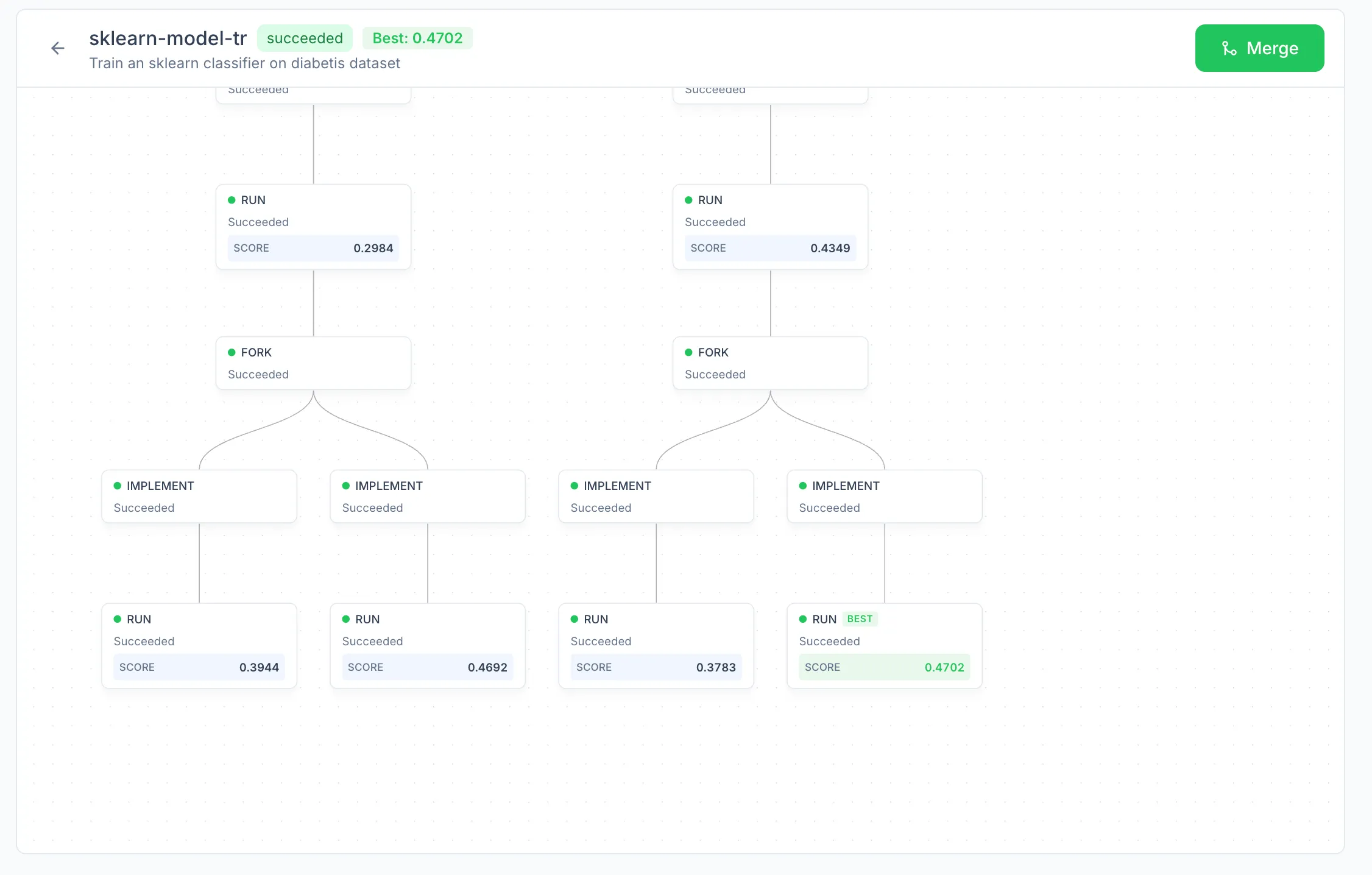
A finished workflow has a best node: the leaf whose recorded metric is highest. Merging a workflow merges the best leaf's branch into the base branch. Branches associated with other leaves and intermediate nodes are not merged automatically, but they remain available in the repository under the prisma/ prefix and can be inspected, compared, or merged manually if needed. The Merge action is enabled only once the workflow's status is succeeded and a best node has been identified.